
Are you sitting there looking at the original screen in your BMW and thinking it feels a bit dated? You're not alone. It's one of the most common questions we get: "I want CarPlay/Android Auto in my car, but which solution should I choose?" There are three main routes — Android screen, Linux screen and CarPlay box — and they essentially solve the same problem in three completely different ways. Here we go through the differences so you can choose based on what actually matters to you.
Check this before you buy anything at all
Before you spend money on anything: check whether your car already has CarPlay or Android Auto built in. BMW began offering CarPlay on certain models from 2016/2017 (at the time it required the NBT Evo system and iDrive 5 or newer), but charged for it for a long time — first as a one-off fee, and later as an annual subscription. After quite a bit of criticism, BMW made the feature free for all compatible cars in December 2019. So if you have a newer car with a navigation system, it may be enough to activate the feature in the ConnectedDrive/My BMW app instead of buying any hardware at all.
If, on the other hand, you have an older car — for example an E46, E60, E90 or an F-generation from before 2017 — it simply lacks the support at its core, and that's when it's time to look at the aftermarket solutions below.
Android screen: the complete package
An Android screen replaces the entire original iDrive screen with a new touchscreen running its own Android-based operating system. It's not just a CarPlay solution: it's a standalone unit with Google Play, its own GPS and Bluetooth. (A reversing camera can be connected whichever of the three options in this post you choose, by the way.)
The advantages: You often get a larger and sharper screen than the original, access to apps like Spotify, YouTube and Google Maps directly in the system (without the phone even needing to be connected), and a substantial upgrade in features. Most of these swaps are plug-and-play and can be installed yourself in under an hour, like the other alternatives.
The drawbacks: Installation means the physical original screen is replaced, but you can always switch back to the car's original menus whenever you want, like the other alternatives. Because it's a full-fledged Android device with an app store, background services and more to process, quality can vary a great deal between manufacturers: performance, audio integration and how well it handles cabin heat depend heavily on which unit you buy.
We have Android screens for most generations, including E90/E91/E92/E93, F30/F31/F32/F33/F34 and F10/F11. Our units are built with quality components and updated software, which gives a fast, lag-free experience compared to many of the other variants found all over the internet, and all screens come with a 2-year warranty. If you can't find your model in the links, look it up in the store — the odds are good that we have it.
Linux screen: the same idea, a simpler engine
Physically, a Linux screen is the same thing as an Android screen: it replaces the original screen and sits in the same place. The difference is under the hood: instead of a full Android operating system, it runs a considerably simpler, Linux-based interface whose only job is to mirror CarPlay or Android Auto from your phone.
The advantages: Because the system has no app store, no background processes and nothing to "clutter up" over time, Linux screens usually boot noticeably faster and feel more stable the older they get. There is simply less that can go wrong or slow down over time. Just like the CarPlay box (see below), many of these units are also built to let the phone send audio and calls via the car's own Bluetooth system, which means you keep using the original microphone and speakers instead of an extra microphone that has to be stuck on somewhere.
The drawbacks: Without an app store, you're limited to what CarPlay and Android Auto actually display. If the phone isn't connected, you have no navigation, Spotify or similar to fall back on — unlike an Android screen, which can stand on its own.
Here we have to be honest: our Linux screens are not on the website yet, but they're on the way and will be arriving shortly for the F10/F11, F20/F21/F22/F23, F30/F31/F32/F33/F34, E60/E61/E63/E64 and E90/E91/E92/E93. Keep an eye on navifly-mall.com or get in touch if you'd like to know when they launch.
CarPlay box: keep the original, just add the feature
The third option doesn't touch the screen at all. A CarPlay box (often called an MMI box) is a small unit that is connected in behind the existing iDrive screen — whether you have CIC, NBT or NBT EVO — and adds wireless Apple CarPlay and Android Auto on top of the existing system. No new screen is needed.
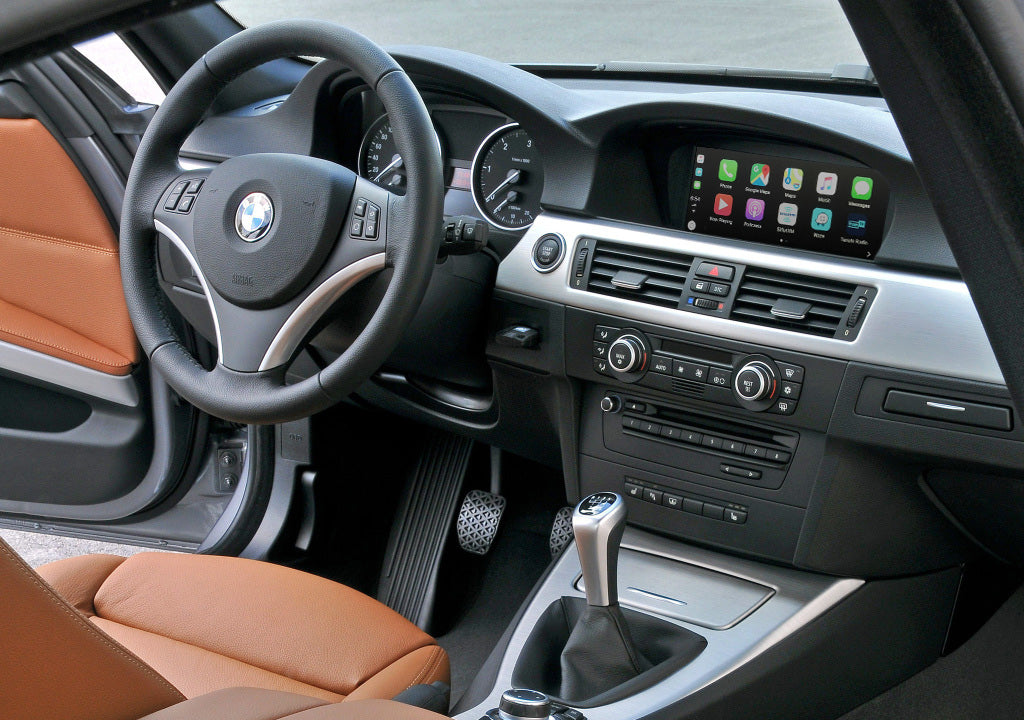
The advantages: You keep 100% of the original feel, since the screen is the same, with the same menus and steering wheel buttons to control everything. Audio and calls go via the car's own Bluetooth system, so you keep using the original microphone and speakers exactly as before. It's also the cheapest and least invasive route to CarPlay/Android Auto, and since nothing original is replaced, it doesn't affect the car's appearance or its resale value to any notable degree.
The drawbacks: You're locked to the original screen's size and resolution: no new, larger or sharper display. And just as with the Linux screen, you only get the CarPlay/Android Auto features — no standalone app platform.

We sell a wireless CarPlay & Android Auto box that fits most BMW models with NBT, NBT EVO or CIC systems, from the 1 Series to the 7 Series as well as the X1/X3/X4/X5/X6.
How to choose
- Do you want a total upgrade with a bigger screen, your own apps and a more "modern car" feel, even when the phone is disconnected? Go for an Android screen.
- Do you want speed, stability and good audio/calls via the car's own system, and can you live with the phone always needing to be along for the ride? Go for a Linux screen.
- Do you just want to add CarPlay/Android Auto without touching anything else, at the lowest possible cost and with minimal intrusion? Then the CarPlay box is the right choice.
Unsure which one suits your particular model, or what your car already supports? Write to us and we'll gladly help you work out which option is best for your BMW.